Prompt Engineering Handbook
A Short, Practical Guide to the Techniques You Will Actually Use
Table of Contents
- What is Prompt Engineering?
- Anatomy of a Good Prompt
- System Prompt vs. User Prompt
- The Core Techniques
- Structuring Prompts for Reliability
- Common Mistakes to Avoid
- Quick Hands-On Lab
- Cheat Sheet / What to Do Next
1. What is Prompt Engineering?
Prompt engineering is basically the practice of wording your input properly, so a generative AI model gives you a better, more reliable answer — without changing the model itself.
Same model, different results:
| Prompt | Result quality |
|---|---|
| “Tell me about electric cars.” | Vague, generic, length keeps changing |
| “List 3 pros and 3 cons of electric cars, in bullet points, under 100 words.” | Specific, consistent, usable right away |
Nothing about the model changed between these two prompts. Only the wording changed. That gap is exactly what prompt engineering closes.
In terms of tools you already know
You have probably done this already, without calling it “prompt engineering.” When you ask ChatGPT or Claude a vague question and get a vague answer, and then you add more detail and suddenly get a much better answer — that improvement is prompt engineering, happening in real time. Even Cursor works this way: a vague instruction like “make this better” gives a weak code change, but “refactor this function to handle null values, and add a comment explaining why” gives a far more useful result.
2. Anatomy of a Good Prompt
Most good prompts are made up of up to four parts. You do not always need all four, but knowing them helps you figure out why a prompt is not working well.
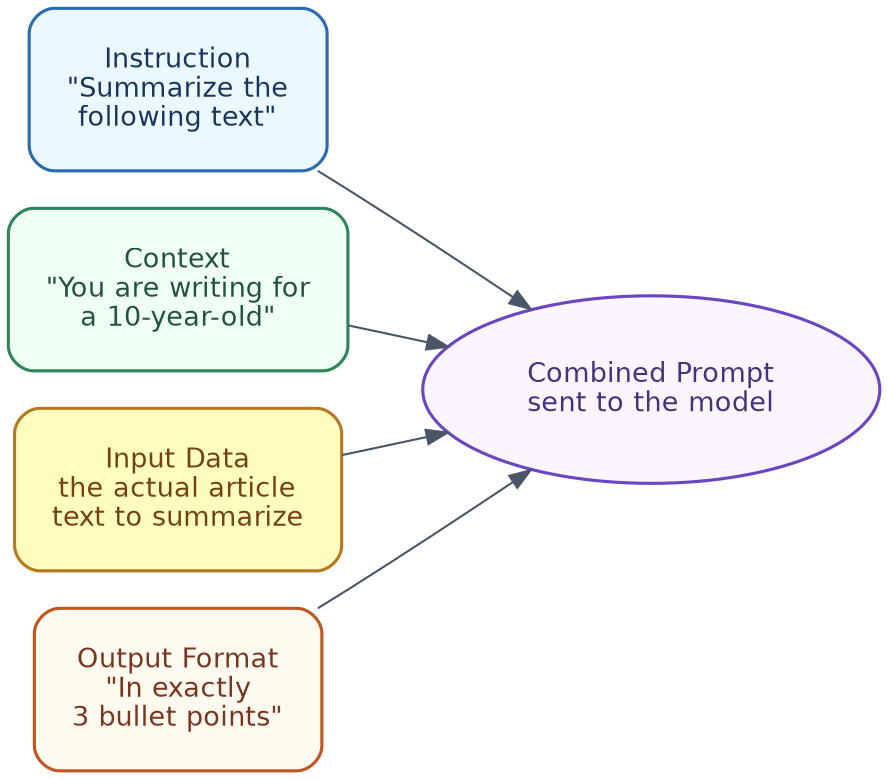
| Part | What it does | Example |
|---|---|---|
| Context | Background that shapes the response | “You are writing for a 10-year-old” |
| Instruction | What you want done | “Summarize the following text” |
| Input data | The actual content to work on | The article, code, or data itself |
| Output format | How the answer should look | “In exactly 3 bullet points” |
Combined example:
You are writing for a 10-year-old. Summarize the following text in exactly
3 bullet points:

"[article text goes here]"
In terms of tools you already know
When you paste code into Cursor and say “explain this function to me like I am new to this codebase,” you are giving it context (new to this codebase) and an instruction (explain), even without input data written separately — Cursor is already looking at the code as the input. In Claude Projects, or when giving ChatGPT custom instructions, you are basically setting the “context” part once, so you do not need to repeat it in every single message.
3. System Prompt vs. User Prompt
| Type | Purpose | Example |
|---|---|---|
| System prompt | Sets behaviour for the whole conversation, usually set once by the developer | “You are a helpful support agent. Always be polite and concise.” |
| User prompt | The specific question or request, each time | “My order hasn’t arrived yet, what do I do?” |
Why this matters: The system prompt is where you bake in consistent rules (tone, role, boundaries), so you do not have to repeat them in every single user message.
In terms of tools you already know
When you open Cursor’s settings and add “rules” for how it should write code (for example, “always use TypeScript, always add comments”), that is a system prompt, set once, applying to every request after that. ChatGPT’s “Custom Instructions” and Claude’s “Custom Styles” or Project instructions work exactly the same way — you set it once, and it quietly shapes every answer after that, without you needing to repeat yourself.
4. The Core Techniques
These five cover the large majority of real-world prompting needs.

4.1 Zero-shot prompting
Just ask directly, no examples given.
Classify the sentiment: "The food was cold and the service was slow."
Good for simple, common tasks the model already handles well.
4.2 Few-shot prompting
Show 2-3 examples of the pattern you want, before the real request.
Review: "Amazing food, great service!" → Positive
Review: "Terrible experience, never going back." → Negative
Review: "The food was cold and the service was slow." →
Use this when you need a specific format, or the task is a bit unusual.
4.3 Chain-of-thought prompting
Ask the model to reason step-by-step before giving a final answer — this improves accuracy on anything multi-step.
A store had 120 apples. They sold 45 in the morning and 30 in the afternoon.
How many are left? Think step by step before giving the final answer.
4.4 Role / persona prompting
Assign the model a role, to shape tone and depth.
You are an experienced financial advisor. Explain compound interest to a
16-year-old in simple terms.
4.5 Format, length, and tone constraints
Be explicit about what the output should look like.
Summarize this article in exactly 3 sentences, in a neutral tone, avoiding jargon.
Simple rule of thumb: Start with zero-shot. If the output is inconsistent, add few-shot examples. If it is getting facts or logic wrong, add chain-of-thought. Always add format constraints, if you need a predictable structure.
In terms of tools you already know
- Few-shot prompting is what you are doing when you paste 2-3 example commit messages into Cursor and say “write a commit message in this style” — you are showing the pattern, not just describing it.
- Chain-of-thought is basically what ChatGPT’s reasoning models and Claude’s extended thinking mode already do on their own, before answering a hard question — you can often expand and read this thinking step yourself.
- Role prompting is exactly what happens when you tell Claude, “act as a strict code reviewer,” before asking it to check your code — the tone and strictness of the review changes noticeably.
5. Structuring Prompts for Reliability
Use delimiters to separate instructions from data
Without a clear separator, the model can get confused between your instructions and the content you gave it — this becomes a bigger problem with longer inputs.
Summarize the text between the triple quotes in 2 sentences.

"""
[article text goes here]
"""
Triple quotes, markdown headers, or tags like <text>...</text> all work fine — just pick one, and use it consistently.
Ask for structured output directly
Extract the name, date, and total from this receipt. Return it as JSON with
keys "name", "date", and "total".
This is far more reliable than asking for the same information “in a sentence,” and then trying to parse it yourself afterward.
Use negative constraints
Sometimes it is easier to say what NOT to do.
Summarize this article. Do not include any opinions, only factual statements
from the text.
In terms of tools you already know
When you paste a big error log into ChatGPT or Claude and wrap it in triple backticks before asking your question, you are using a delimiter, exactly as described above — this stops the model from confusing the error log with your actual instructions. Cursor does this automatically for you behind the scenes, whenever it includes your code as context along with your instruction, keeping the two cleanly separated.
6. Common Mistakes to Avoid
| Mistake | What goes wrong | Fix |
|---|---|---|
| Vague instructions | “Make this better” — the model has to guess what “better” means | Be specific: “make this more concise,” or “make this more formal” |
| Overloading one prompt | Asking for a summary, translation, and sentiment analysis, all in one go, often makes all three worse | Split into separate prompts, or clearly numbered steps |
| Assuming memory | Referring to “that document,” without actually including it | Always include the actual content the model needs, every single time |
| Prompt injection | If you paste in untrusted text (like a scraped webpage), it may contain hidden instructions that hijack the model’s behaviour | Treat pasted-in external content as data, not instructions; keep instructions and untrusted content clearly separated using delimiters |
In terms of tools you already know
If you have ever asked ChatGPT or Claude to “fix my resume,” and got a generic, unhelpful answer, that is the “vague instructions” mistake in action — asking instead “make this resume more concise, and highlight my leadership experience for a manager role” works far better. If you have asked Cursor to “fix the bug, refactor the whole file, and also add tests” all in a single message, and it did a mediocre job at all three, that is the “overloading one prompt” mistake — breaking that into three separate requests usually gives much better results for each one.
7. Quick Hands-On Lab
A short script comparing zero-shot, few-shot, and chain-of-thought, side-by-side, on the same task, using a free local LLM (Ollama — no API key, no cost).
Setup:
brew install ollama
ollama pull llama3.1
pip install requests
The script:
"""
compare_prompts.py — runs the same underlying task through three
different prompting techniques and prints each result for comparison.
"""

import requests

OLLAMA_URL = "http://localhost:11434/api/generate"
MODEL = "llama3.1"


def generate(prompt: str) -> str:
    response = requests.post(
        OLLAMA_URL,
        json={"model": MODEL, "prompt": prompt, "stream": False},
        timeout=120,
    )
    response.raise_for_status()
    return response.json()["response"]


review = "The food was cold and the service was slow."

zero_shot = f'Classify the sentiment of this review: "{review}"'

few_shot = f"""Review: "Amazing food, great service!" -> Positive
Review: "Terrible experience, never going back." -> Negative
Review: "{review}" ->"""

chain_of_thought = (
    f'Classify the sentiment of this review, thinking step by step about '
    f'the tone before giving a final one-word answer: "{review}"'
)

print("--- Zero-shot ---")
print(generate(zero_shot))

print("\n--- Few-shot ---")
print(generate(few_shot))

print("\n--- Chain-of-thought ---")
print(generate(chain_of_thought))
Run it with python3 compare_prompts.py, and compare the three outputs — notice how few-shot tends to give back a clean, single-word label, while chain-of-thought shows its reasoning first, before the final answer.
8. Cheat Sheet / What to Do Next
| If you need… | Use… |
|---|---|
| A quick, simple answer | Zero-shot |
| Consistent formatting, or an unusual pattern | Few-shot |
| Better accuracy on multi-step reasoning | Chain-of-thought |
| Consistent tone or depth of expertise | Role/persona prompting |
| A specific structure, every time | Explicit output format instructions |
| To process long or untrusted text safely | Delimiters, separating instructions from data |
What to do next:
- Try the lab in Section 7, and swap in your own task.
- Next time you use ChatGPT, Claude, or Cursor, notice which technique from Section 4 you are actually using, without realising it — this is the fastest way to get better at prompting.
- Read the Generative AI Fundamentals Handbook’s section on RAG — grounding prompts in real data is the natural next step, once these basics feel comfortable.
- If you start building multi-step or tool-using prompts regularly, that is the point where it is worth exploring agents (covered in the Agentic AI Handbook).
End of Handbook