AI Fundamentals Handbook
A Simple Guide, Aligned with the AI Fundamentals Program with Azure
Table of Contents
- Welcome to the AI Fundamentals Program
- Introduction to AI Fundamentals with Azure
- AI and ML Core Concepts
- Machine Learning
- Computer Vision
- Natural Language Processing
- Conversational AI
- Putting It All Together
- Where to Go Next
1. Welcome to the AI Fundamentals Program
Welcome! This handbook is your companion through the AI Fundamentals Program. It is written for beginners — you do not need any coding or data science background to get started, though a few sections (like Machine Learning) get a bit more hands-on.
Artificial Intelligence and Machine Learning are team sport. The number of roles involved in AI and ML initiatives can vary based on the organizations’ size. Most organizations start with a Machine Learning team and complement with an AI team moving forward.
- External Stakeholders: Executives, customers, and managers from other groups in the organization.
- Data Scientists: They identify use cases and determine the suitable datasets and algorithms for experiments. They build the AI models.
- Data Engineers: They focus on making the data available and accessible to data scientists integrating various data sources, optimizing access to data.
- AI Architects: They connect data scientists, data engineers, software developers, and developer operations to get the solution up and running, including the assessment of infrastructure requirements.
- ML Engineers: Subject matter experts in their area and make sure AI models are suitable for production use.
- AI Developer: Focuses on the development and implementation of AI solutions.
- Data Analyst: Uses machine learning to extract insights from data.
2. Introduction to AI Fundamentals with Azure
Course overview
This program introduces the basic building blocks of AI and Machine Learning, using Microsoft Azure as the platform. Azure gives you pre-built AI services (so you do not need to build models from scratch), along with tools to train your own custom models.
Course structure, at a glance:
| Module | Focus |
|---|---|
| Core Concepts | Vocabulary and responsible AI principles |
| Machine Learning | Training and evaluating models using Azure Machine Learning |
| Computer Vision | Working with images, using Azure Cognitive Services |
| Natural Language Processing | Working with text and speech |
| Conversational AI | Building bots, powered by a knowledge base |
Prerequisites
- Basic computer skills (using a web browser, navigating a cloud portal)
- No prior programming or AI experience needed
- An Azure account is helpful for hands-on practice (a free tier is available), but this handbook explains the concepts fine, even without one
A short history — how AI and ML developed
- 1950s — Alan Turing proposes the idea of a machine that can “think” (the Turing Test).
- 1980s-90s — Expert systems and early pattern-recognition approaches come up, but are limited, since rules had to be hand-coded.
- 2000s — Machine Learning starts gaining ground, as data and computing power both grow — instead of hand-coding rules, systems start learning patterns directly from data.
- 2010s — Deep Learning (neural networks with many layers) brings big breakthroughs in image recognition, speech, and translation.
- Today — Cloud platforms like Azure package all these advances into ready-to-use services, so developers can add AI capabilities, without building models from scratch.
Simple example: Predicting whether an email is spam used to need someone writing rules like, “if it contains the word ‘free,’ mark it as spam.” Modern ML instead learns what spam looks like, from thousands of labelled examples.
In terms of tools you already know
ChatGPT and Claude are the most visible result of this whole history — they are Deep Learning models, trained on huge amounts of data, sitting right at the “Today” point in this timeline. When you use Cursor, you are actually using this same underlying technology (a large language model), just applied specifically to reading and writing code, instead of general text.
3. AI and ML Core Concepts
Key terms
| Term | Simple meaning | Example |
|---|---|---|
| Artificial Intelligence (AI) | Machines doing tasks that normally need human intelligence | A car recognising a stop sign |
| Machine Learning (ML) | A way of achieving AI, by learning patterns from data, instead of following hard-coded rules | A model learning to predict house prices, from past sales |
| Deep Learning | ML using layered neural networks, good at complex patterns like images and speech | Facial recognition in photos |
| Model | The trained “brain” that makes predictions | A trained spam-detection model |
| Training data | The examples used to teach a model | 10,000 labelled emails (spam / not spam) |
| Features | The input variables a model uses to make predictions | House size, location, number of bedrooms |
| Label | The correct answer used during training (in supervised learning) | “spam” or “not spam” |
| Algorithm | The method used to find patterns in data | Linear regression, decision trees, neural networks |
How AI, ML, and Deep Learning relate
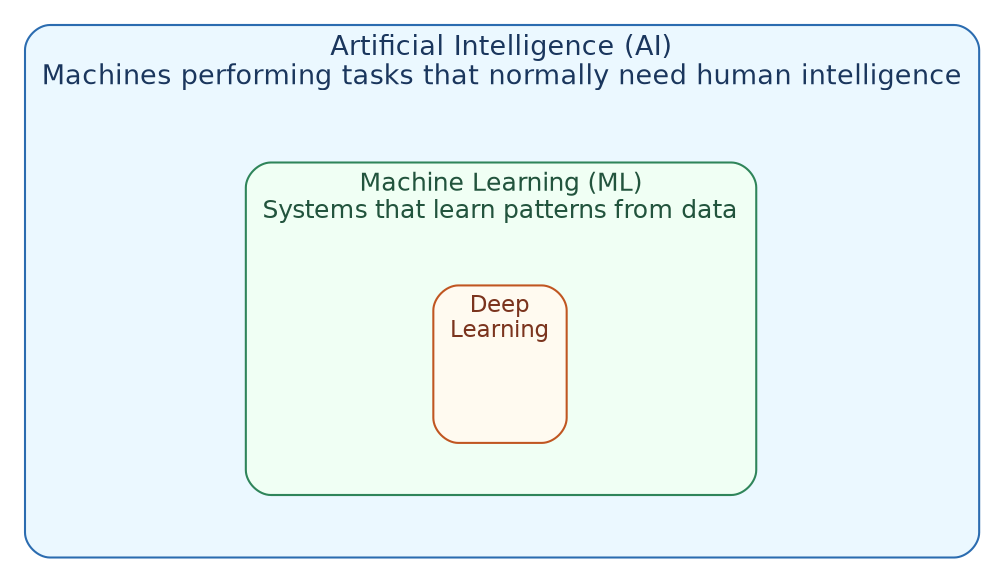
Deep Learning is a subset of Machine Learning, and Machine Learning is a subset of AI. Not all AI uses ML (some AI is just rule-based), and not all ML uses Deep Learning (many models use much simpler algorithms).
Types of Machine Learning
| Type | How it works | Example |
|---|---|---|
| Supervised learning | Learns from labelled examples (input plus correct answer) | Predicting house prices from past sales, where prices are already known |
| Unsupervised learning | Finds patterns in data, without any labels | Grouping customers into segments, based on shopping habits |
| Reinforcement learning | Learns by trial and error, getting rewards or penalties | A game-playing AI that keeps improving, by playing many rounds |
Responsible AI
Responsible AI is basically a set of principles, to make sure AI systems are built and used ethically. Microsoft’s Responsible AI principles (used across Azure’s AI tools) include:
- Fairness — the model should not discriminate against any group of people (for example, a loan-approval model should not be biased by race or gender).
- Reliability and safety — the system should perform consistently and safely, especially for critical use cases (for example, a medical diagnosis tool).
- Privacy and security — personal data used to train or run models must be protected properly.
- Inclusiveness — AI systems should be usable by people of all abilities and backgrounds.
- Transparency — people should understand how and why an AI system made a particular decision.
- Accountability — there should always be humans responsible for how an AI system behaves.
Simple example of why this matters: If a hiring model is trained mostly on resumes from one demographic, it may end up unfairly favouring similar candidates in the future — this is a fairness problem, exactly the kind that Responsible AI practices try to catch before deployment.
In terms of tools you already know
Both ChatGPT and Claude publish safety and responsible-use policies, and both companies (OpenAI and Anthropic) invest heavily in exactly these principles — fairness, safety, transparency — while training and releasing their models. When Claude or ChatGPT declines to answer something harmful, or adds a caveat to a sensitive answer, that is Responsible AI, working in practice, not just in theory.
4. Machine Learning
Training and evaluating models with Azure Machine Learning
Azure Machine Learning (Azure ML) is a cloud service for building, training, and deploying ML models — either by writing code, or using no-code/low-code tools.
The basic ML workflow

Simple example — predicting house prices:
- Collect data: past home sales, with size, location, number of bedrooms, and sale price.
- Prepare data: remove incomplete records, split into a training set (80%) and a test set (20%).
- Train a model: the algorithm learns the relationship between features (size, location) and the label (price).
- Evaluate: check how close the model’s predictions are, to the actual prices in the test set.
- Deploy: publish the model as a web endpoint, so other applications can call it.
- Predict: a real-estate app sends a new house’s details, and gets back a predicted price.
Automated Machine Learning (AutoML)
AutoML automatically tries out multiple algorithms and settings, and then picks the best-performing one — without you having to manually test each one yourself.
Example: You upload a dataset of customer churn (whether a customer cancelled their subscription). AutoML tries logistic regression, decision trees, and several other algorithms, then tells you which one predicts churn most accurately — all without you writing any training code.
Azure Machine Learning Designer
The ML Designer is a drag-and-drop, visual interface for building ML pipelines — connecting boxes for data input, data cleaning, training, and evaluation, without writing any code.
Example pipeline (in plain words):
[Import Data] → [Clean Missing Data] → [Split Data (train/test)]
      → [Train Model] → [Score Model] → [Evaluate Model]
Each box gets dragged onto a canvas, and connected with arrows — quite useful for beginners who want to understand the ML process visually, before writing any code themselves.
Key evaluation metrics (in simple words)
| Metric | Used for | Simple meaning |
|---|---|---|
| Accuracy | Classification | Percent of predictions that were correct |
| Precision | Classification | Of the times the model said “yes,” how often was it actually right? |
| Recall | Classification | Of all the actual “yes” cases, how many did the model actually catch? |
| Mean Absolute Error (MAE) | Regression (predicting numbers) | On average, how far off were the predictions? |
Example: A model predicting house prices with an MAE of $10,000 means, on average, its predictions are off by about $10,000 — useful for deciding if the model is “good enough” for real use.
In terms of tools you already know
This whole “collect, train, evaluate, deploy” workflow is exactly what happened, at a much bigger scale, to build the models behind ChatGPT and Claude — huge amounts of text data collected, models trained on it, evaluated for quality and safety, then deployed as the chat assistants you already use every day. When you ask Cursor to autocomplete your code, it is using a model that went through this exact same pipeline, just trained specifically on programming code as well as general text.
5. Computer Vision
Azure Cognitive Services for image-based workloads
Computer Vision lets applications “see” and understand visual information — photos, video frames, or scanned documents — without you having to build an image-recognition model from scratch.
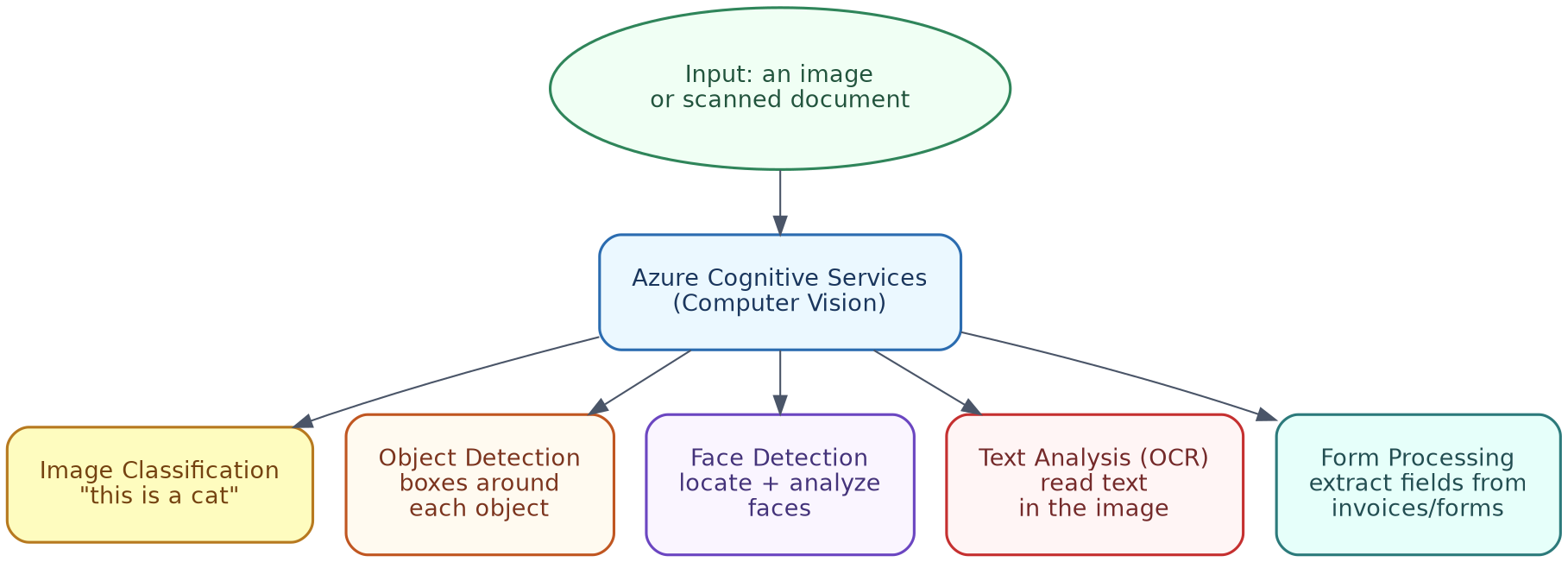
Key workloads
1. Image Classification Gives a single label (or a few) to the whole image. Example: Upload a photo → the service returns “cat,” with 96% confidence.
2. Object Detection Finds multiple objects inside an image, and draws a box around each one. Example: A photo of a kitchen returns boxes around “refrigerator,” “table,” and “chair,” each with its own confidence score.
3. Face Detection Locates faces in an image, and can analyse attributes like approximate age range or emotion (subject to Responsible AI limits on sensitive attribute detection). Example: A photo of a group returns 4 detected faces, each with a bounding box.
4. Text Analysis (OCR — Optical Character Recognition) Reads printed or handwritten text inside an image. Example: A photo of a street sign returns the extracted text — “Main Street.”
5. Form Processing
Extracts structured data (fields, tables, key-value pairs) from documents like invoices or receipts.
Example: A scanned invoice returns structured fields — Vendor: Acme Corp, Total: $452.00, Date: 2026-03-14 — instead of just raw, unstructured text.
Simple example scenario
A retail company wants to process thousands of scanned receipts. Instead of manually typing each one into a spreadsheet:
- Each receipt image goes to a Form Processing model.
- The model automatically pulls out vendor name, date, and total.
- Results get saved directly into the company’s expense system.
This turns a manual task (hours of typing) into an automated one (seconds per receipt).
In terms of tools you already know
Both ChatGPT and Claude can now “see” images too, not just text — you can upload a photo, and ask what is in it, which is basically Image Classification and Object Detection, happening right inside your chat. If you upload a screenshot of an error message to Cursor, and it reads and explains the text in it, that is OCR (text analysis) happening automatically, without you needing to type the error out yourself.
6. Natural Language Processing
Working with text and speech
Natural Language Processing (NLP) lets applications understand, analyse, and generate human language — both written text, and spoken audio.
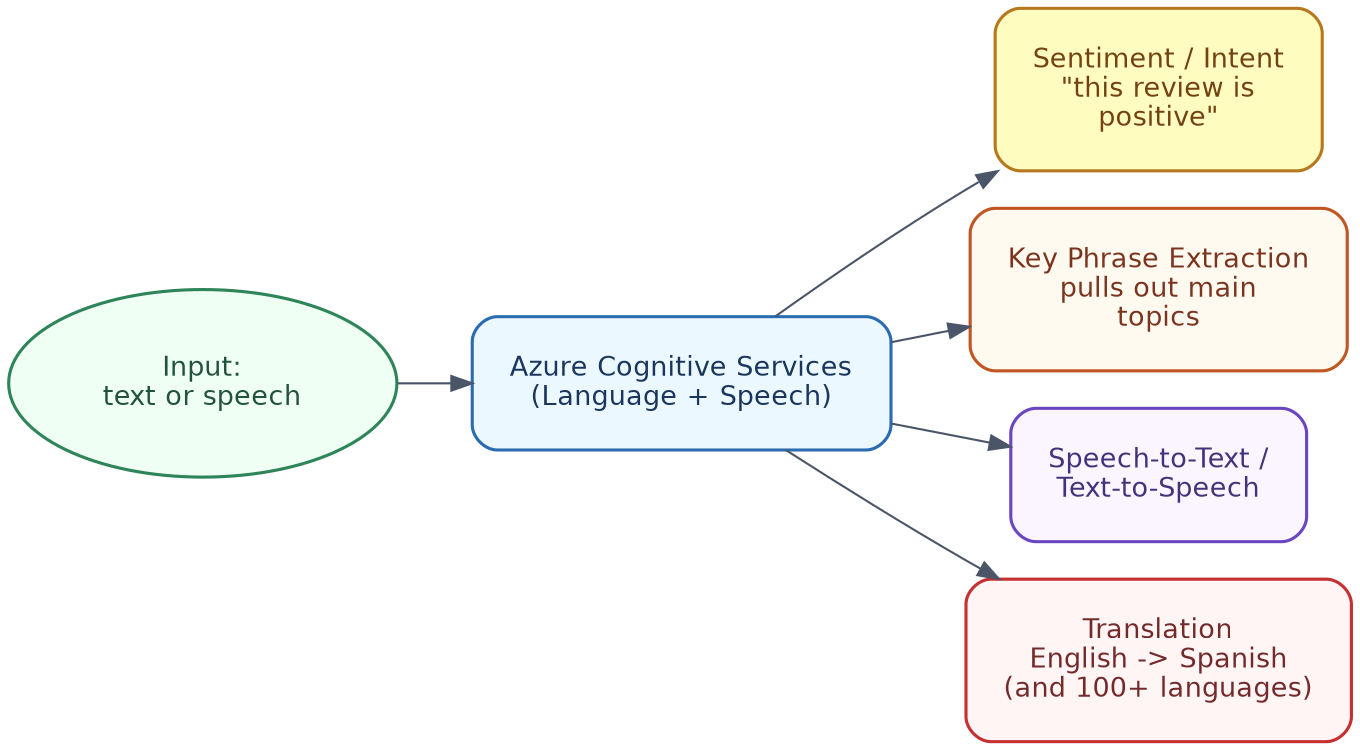
Key capabilities
1. Sentiment Analysis / Intent Recognition Figures out whether text is positive, negative, or neutral — or what exactly the user is trying to do. Example: “This product broke after one day!” → sentiment: negative. Example (intent): “Book me a flight to Paris” → intent: BookFlight, entity: destination = Paris.
2. Key Phrase Extraction
Pulls out the main topics or phrases from a block of text.
Example: “The battery life on this laptop is amazing, but the screen is too dim” → key phrases: battery life, screen brightness.
3. Speech-to-Text and Text-to-Speech Converts spoken audio into written text, and the other way around too. Example: A voice memo saying “Remind me to call mom at 5pm” gets transcribed into text, that a scheduling app can then act on.
4. Translation Translates text or speech, between languages. Example: “Where is the nearest train station?” → Hindi: “सबसे नज़दीकी रेलवे स्टेशन कहाँ है?”
Simple example scenario
A customer support team gets thousands of chat messages every day. Using NLP:
- Each incoming message is checked for sentiment — flagging angry customers, for priority handling.
- Key phrases are pulled out, to tag common issues (for example, “refund,” “shipping delay”).
- Non-English messages get automatically translated, so any agent can respond, regardless of language.
In terms of tools you already know
Every single time you chat with ChatGPT or Claude, NLP is happening under the hood — understanding your intent, generating a relevant reply, and so on. If you ask Claude or ChatGPT to “translate this paragraph to Hindi,” or “tell me the sentiment of this customer review,” you are directly using the exact capabilities described in this section, just through a chat interface, rather than a separate Azure service.
7. Conversational AI
Building a knowledge base and a bot
Conversational AI lets users interact with a system through natural conversation — usually through a chatbot — instead of navigating through menus or forms.
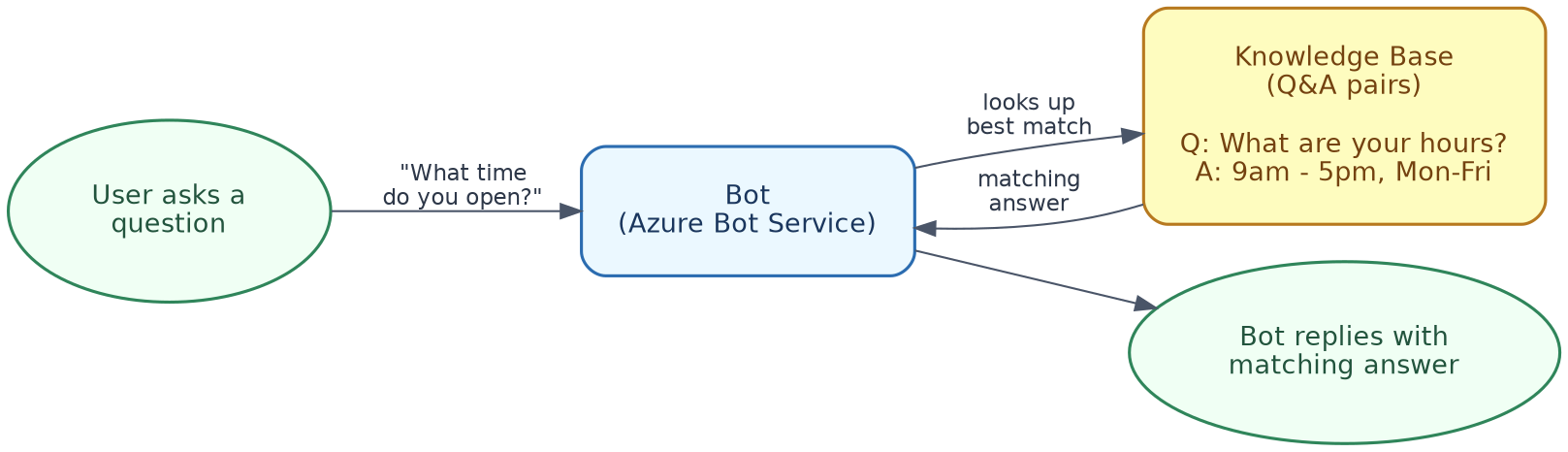
Step 1 — Create a knowledge base (Question and Answer pairs)
A knowledge base is a structured set of questions, along with their matching answers, often built from an FAQ page or support documentation.
Example knowledge base entries:
| Question | Answer |
|---|---|
| What are your store hours? | We’re open 9am-5pm, Monday to Friday. |
| How do I reset my password? | Go to Settings > Account > Reset Password. |
| Do you offer refunds? | Yes, within 30 days of purchase, with a receipt. |
The knowledge base service matches a user’s question (even if worded differently) to the closest known question-answer pair.
Example of matching flexibility: A user asking “When are you open?” should still match the “store hours” entry, even though the wording is different — the service uses language understanding for this, not just exact text matching.
Step 2 — Build a bot on top of the knowledge base
A bot is the conversational interface — it receives user messages, checks the knowledge base for the best-matching answer, and replies back.
Simple example conversation:
User: Hey, can I get my money back for a shirt I bought last week?
Bot:  Yes, we offer refunds within 30 days of purchase with a receipt.
Where bots typically live
Bots built this way can be published to many channels — a website chat widget, Microsoft Teams, Slack, or a mobile app — without rebuilding the underlying knowledge base separately, for each one.
Simple example scenario
A university wants to cut down on repetitive emails to its admissions office:
- Staff build a knowledge base from the “Frequently Asked Questions” page (application deadlines, required documents, tuition costs).
- A bot gets connected to this knowledge base, and published on the university’s website.
- Prospective students get instant answers to common questions, and staff only need to handle unique, more complex questions.
In terms of tools you already know
A custom “GPT” you build inside ChatGPT, or a Claude Project with specific instructions and documents attached, is basically a small, personal version of this whole pattern — you are giving it a “knowledge base” (your documents or instructions), and it acts like the bot on top of it, answering questions grounded in that specific content, instead of just general knowledge.
8. Putting It All Together
Here is how the modules connect, in a realistic project — an AI-powered customer service platform for an online retailer:
| Need | Azure AI Area Used |
|---|---|
| Predict which customers are likely to cancel their subscription | Machine Learning (Azure ML / AutoML) |
| Read and pull data from scanned return-request forms | Computer Vision (Form Processing) |
| Detect angry customers from support chat messages | Natural Language Processing (Sentiment Analysis) |
| Answer common customer questions instantly | Conversational AI (Knowledge Base + Bot) |
| Make sure the churn-prediction model is not biased against any customer group | Responsible AI principles (Core Concepts) |
No single module solves the whole problem on its own — real systems usually combine several Azure AI services together, guided throughout by Responsible AI principles.
9. Where to Go Next
Suggested learning path:
- Set up a free Azure account, and explore the Azure Machine Learning Studio interface.
- Try training a simple model using AutoML, on a small sample dataset (for example, predicting Titanic survival — a common beginner dataset).
- Try out a Computer Vision demo (many Azure Cognitive Services offer a browser-based “try it out” demo, with no coding needed).
- Build a small knowledge base, and connect it to a bot, using Azure’s QnA and Bot Service tools.
- Go back to the Responsible AI principles in Section 3, and think about how they would apply to a project you are interested in building.
Good habits, going forward:
- Always ask “what data was this trained on?” before trusting a model’s output blindly.
- Start with pre-built Cognitive Services, before building custom models — they already cover a large percentage of common use cases.
- Treat evaluation metrics (accuracy, precision, recall, MAE) as a checklist, not just a single number — a model can look “accurate” overall, while still performing poorly for a specific group or scenario.
- If you already use ChatGPT, Claude, or Cursor regularly, notice how many of these same ideas (training data, evaluation, responsible use) are quietly working behind the scenes, every time you use them.
End of Handbook